Cyber Security Login Monitoring System in Python Django with Source Code
Introduction
In today’s digital world, securing user authentication is one of the most critical aspects of any web application. The Cybersecurity Login Monitoring System Project is a Python Django-based project that helps organisations monitor, track, and analyse user login activities to detect suspicious login attempts and improve overall security.
This project records every successful and failed login attempt, including IP address, browser details, operating system, device type, login time, and logout time. It also provides a powerful administrator dashboard for monitoring user activities in real time.
Whether you’re a student looking for a final-year project or a developer interested in learning authentication monitoring, this project provides a practical implementation using Python Django.
🚀 Buy the Cyber Security Login Monitoring System Project
Get the complete source code, documentation, report, PPT, and installation guide with instant download.
🛒 Buy Now Get the Complete Project for Just ₹199Features
Administrator Module
- Secure Administrator Login
- Dashboard with Login Statistics
- Manage Registered Users
- Activate or Deactivate User Accounts
- Delete User Accounts
- Search Users
- View User Details
- Monitor Successful Login Activities
- Monitor Failed Login Attempts
- Track Login IP Address
- Browser Detection
- Operating System Detection
- Device Type Detection
- Login & Logout Time Tracking
- Security Reports
User Module
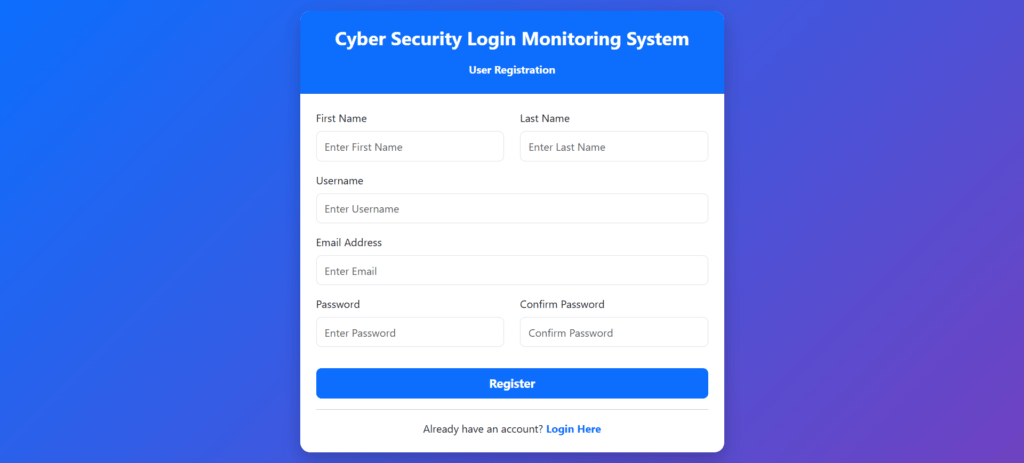
- User Registration
- Secure Login
- Forgot Password
- Profile Management
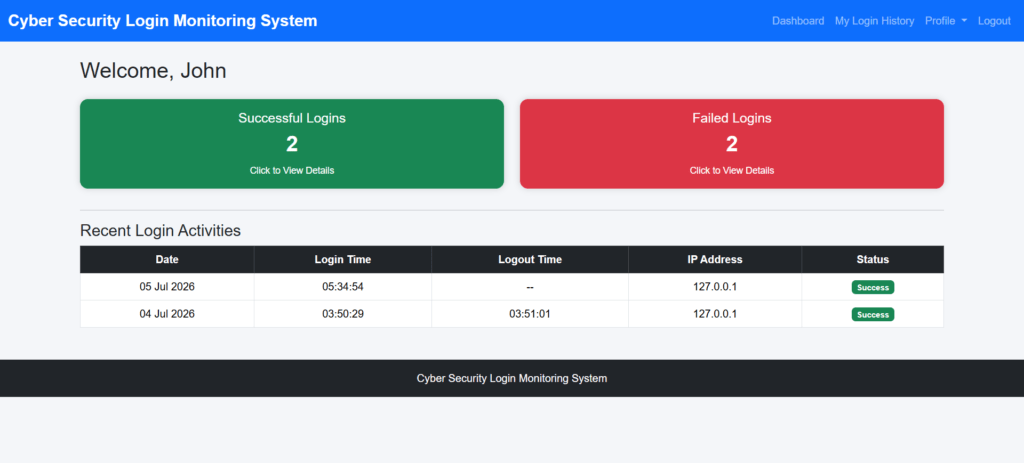
- View Login History
- View Failed Login Attempts
- Change Password
- Secure Logout
Technology Stack
| Technology | Used |
|---|---|
| Python | ✔ |
| Django | ✔ |
| SQLite | ✔ |
| HTML5 | ✔ |
| CSS3 | ✔ |
| Bootstrap | ✔ |
| JavaScript | ✔ |
System Modules
- Authentication Module
- User Management Module
- Login Monitoring Module
- Failed Login Tracking
- IP Tracking Module
- Browser Detection Module
- Device Detection Module
- Security Dashboard
- Reporting Module
What This Project Tracks
- Username
- Login Status
- IP Address
- Browser Name
- Operating System
- Device Type
- Login Date
- Login Time
- Logout Time
- Failed Login Attempts
🚀 Buy the Cyber Security Login Monitoring System Project
Get the complete source code, documentation, report, PPT, and installation guide with instant download.
🛒 Buy Now Get the Complete Project for Just ₹199Benefits of this Project
- Learn Django Authentication
- Understand Login Monitoring
- Improve Cyber Security Knowledge
- Learn Activity Logging
- Understand User Session Management
- Learn Security Best Practices
Who Can Use This Project?
- BCA Students
- MCA Students
- B.Tech Students
- BE Students
- Computer Science Students
- Cyber Security Learners
- Python Django Beginners
Download Includes
- Complete Python Django Source Code
- Database
- Project Report (DOC)
- Project Report (PDF)
- PowerPoint Presentation
- Installation Guide
- Project Documentation
Software Requirements
- Python 3.x
- Django
- SQLite/MySQL
- Visual Studio Code
- PyCharm (Optional)
Project Screenshots
User Registration
User Dashboard
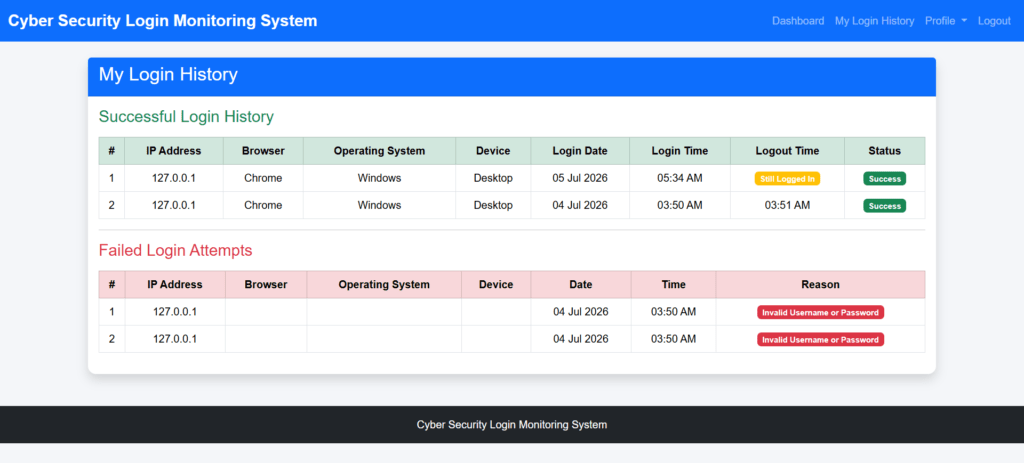
User Login History
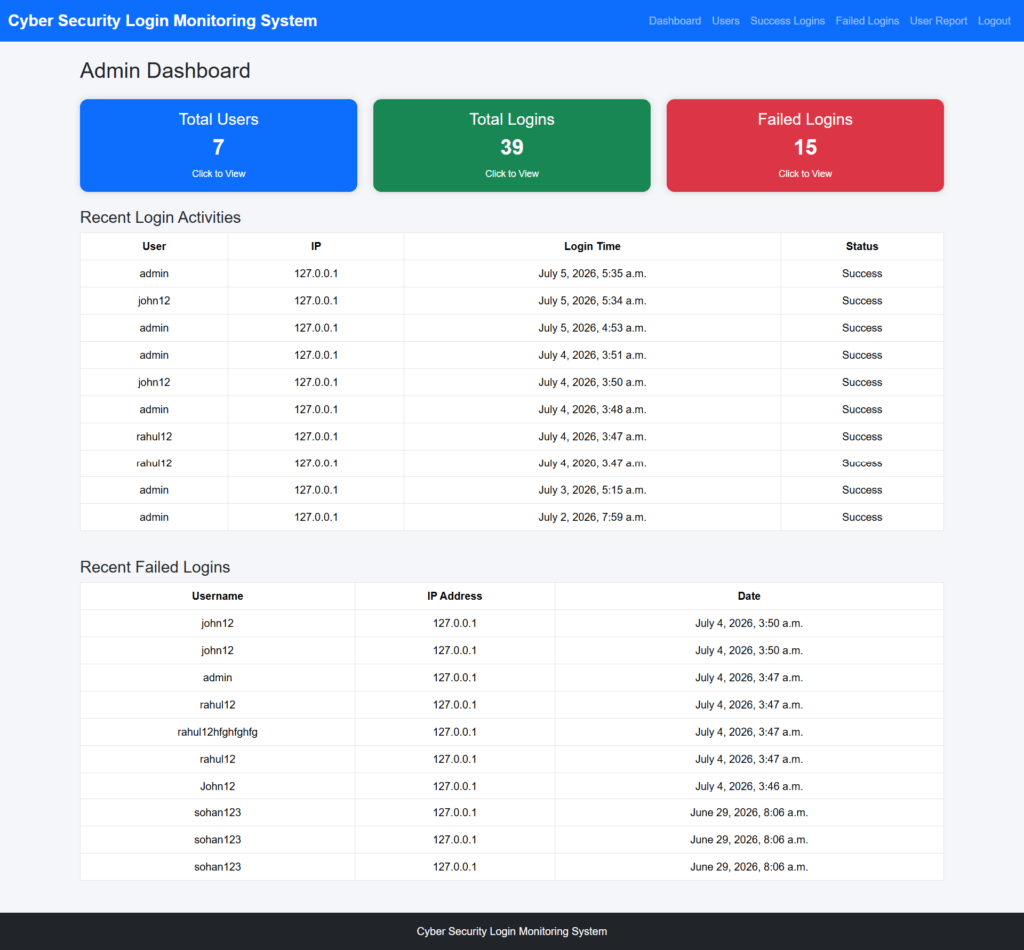
Admin Dashboard
Follow the steps below to run the Cyber Security Login Monitoring System in Python Django on your local system.
How to Run the Project
Step 1: Download the project ZIP file.
Step 2: Extract the ZIP file.
Step 3: Copy the LoginActivityMonitoringSystem folder and paste it on your Desktop.
Step 4: Open PyCharm.
Step 5: Open the terminal in PyCharm.
Step 6: Navigate to the project folder using the cd command.
cd project_pathExample:
cd C:\Users\your_computer_name\OneDrive\Desktop\LoginActivityMonitoringSystemYou can also directly import the project folder into PyCharm.
Step 7: Install the required package.
pip install user-agentsStep 8: Run the Django project.
python manage.py runserverStep 9: Open your browser and visit:
http://127.0.0.1:8000/Now the Cyber Security Login Monitoring System will run successfully.
Login Details
Admin Login
Username: admin
Password: 123
User Login
Username: John12
Password: Test@123
You can also register a new user from the registration page.
🚀 Buy the Cyber Security Login Monitoring System Project
Get the complete source code, documentation, report, PPT, and installation guide with instant download.
🛒 Buy Now Get the Complete Project for Just ₹199Frequently Asked Questions (FAQs)
The Cyber Security Login Monitoring System is a web application developed using Python Django that records and monitors user login activities. It tracks successful and failed login attempts, IP addresses, browser details, operating systems, device types, login time, and logout time.
This project is developed using the following technologies:
Python
Django
HTML5
CSS3
Bootstrap
JavaScript
SQLite/MySQL
Yes. The download package includes the complete Python Django source code along with the database and all required project files.
The project package includes:
Complete Python Django Source Code
Database
Project Report (DOC)
Project Report (PDF)
PowerPoint Presentation (PPT)
Installation Guide
Ready-to-Run Project Files
Yes. This project is suitable for BCA, MCA, B.Tech, BE, Diploma, and other Computer Science or Information Technology students.
The project can run with SQLite by default and can also be configured to use MySQL if required.
Yes. Since the complete source code is included, you can modify the project according to your academic or business requirements.
Yes. Every failed login attempt is recorded with details such as username, IP address, browser, operating system, device information, date, and time to help administrators monitor suspicious activities.
Yes. Technical support is available to help you with project installation and basic setup if you encounter any issues.
Yes. This project is suitable for academic learning and final-year project submissions. You can also enhance or customize it before submission.