How to get Sales reports from the database using PHP
In this tutorial, we will learn how to get sales to report month-wise and year-wise in PHP from the database.
In this example, we will guide you through a step-by-step procedure for sales records.
Sales report data in PHP and MySQL will look as follows:
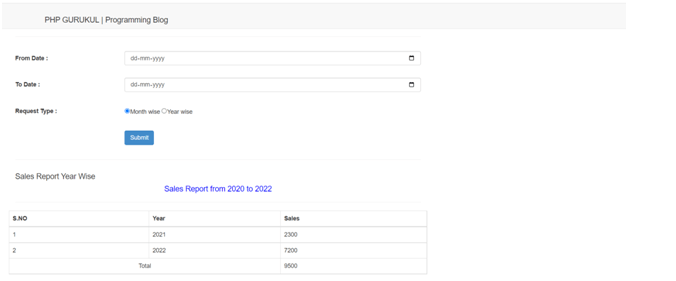
Step1: First create a database with name “salesmydb” where order data is stored.
Step2: Second is to create a table with the name “tblproduct” and insert the products data.
CREATE TABLE tblproduct (
  ID int(10) NOT NULL,
  ProductName varchar(250) DEFAULT NULL,
  MRP decimal(10,0) DEFAULT NULL,
  SellingPrice decimal(10,0) DEFAULT NULL,
  CreationDate timestamp NULL DEFAULT current_timestamp()
) ENGINE=InnoDB DEFAULT CHARSET=latin1;
Step3: Third step is to create a table with the name “tblorder” where order details data is stored.
CREATE TABLE tblorder (
  ID int(5) NOT NULL,
  CustomerName varchar(250) DEFAULT NULL,
  MobileNumber bigint(20) DEFAULT NULL,
  ProductID int(5) DEFAULT NULL,
  Quantity int(10) DEFAULT NULL,
  OrderDate timestamp NULL DEFAULT current_timestamp()
) ENGINE=InnoDB DEFAULT CHARSET=latin1;
Step4: Create a database connection file and save this file with the name “config.php”. Below is the code of database connection.
<?php
$con = mysqli_connect("localhost","root",""," salesmydb");
// Check connection
if (mysqli_connect_errno())
{
echo "Failed to connect to MySQL: " . mysqli_connect_error();
 }
?>
Step5: Create a form with three fields which is “From Date”, “To Date” and “Request Type”
<form name="bwdatesdata" action="" method="post" action="">
  <table width="100%" height="117"  border="0">
<tr>
    <th width="27%" height="63" scope="row">From Date :</th>
    <td width="73%">
<input type="date" name="fdate" class="form-control" id="fdate">
    	</td>
  </tr>
  <tr>
    <th width="27%" height="63" scope="row">To Date :</th>
    <td width="73%">
    	<input type="date" name="tdate" class="form-control" id="tdate"></td>
  </tr>
  <tr>
    <th width="27%" height="63" scope="row">Request Type :</th>
    <td width="73%">
         <input type="radio" name="requesttype" value="mtwise" checked="true">Month wise
          <input type="radio" name="requesttype" value="yrwise">Year wise</td>
  </tr>
<tr>
    <th width="27%" height="63" scope="row"></th>
    <td width="73%">
    <button class="btn-primary btn" type="submit" name="submit">Submit</button>
  </tr>
</table>
     </form>
Step 6: PHP code for fetching data from the database on the basis of from date, to date and request type.
<div class="row">
      <div class="col-xs-12">
      	 <?php
      	 if(isset($_POST['submit']))
{
$fdate=$_POST['fdate'];
$tdate=$_POST['tdate'];
$rtype=$_POST['requesttype'];
?>
<?php if($rtype=='mtwise'){
$month1=strtotime($fdate);
$month2=strtotime($tdate);
$m1=date("F",$month1);
$m2=date("F",$month2);
$y1=date("Y",$month1);
$y2=date("Y",$month2);
    ?>
<h4 class="header-title m-t-0 m-b-30">Sales Report Month Wise</h4>
<h4 align="center" style="color:blue">Sales Report  from <?php echo $m1."-".$y1;?> to <?php echo $m2."-".$y2;?></h4>
<hr >
<div class="row">
 <table class="table table-bordered" width="100%"  border="0" style="padding-left:40px">
<thead>
<tr>
<th>S.NO</th>
<th>Month / Year </th>
<th>Sales</th>
</tr>
</thead>
<?php
$ret=mysqli_query($con,"select month(OrderDate) as lmonth,year(OrderDate) as lyear,
    tblproduct.SellingPrice,tblorder.Quantity from tblorder
    join tblproduct on tblproduct.ID=tblorder.ProductID
    where date(tblorder.OrderDate) between '$fdate' and '$tdate'
    group by lmonth,lyear ");
$num=mysqli_num_rows($ret);
if($num>0){
$cnt=1;
while ($row=mysqli_fetch_array($ret)) {

?>
<tbody>
<tr>
        <td><?php echo $cnt;?></td>
        <td><?php  echo $row['lmonth']."/".$row['lyear'];?></td>
        <td><?php  echo $total=$row['SellingPrice']*$row['Quantity'];?></td>
</tr>
<?php
$ftotal+=$total;
$cnt++;
}?>
<tr>
              <td colspan="2" align="center">Total </td>
              <td><?php  echo $ftotal;?></td>
                </tr>
               </tbody>
</table>
<?php } } else {
$year1=strtotime($fdate);
$year2=strtotime($tdate);
$y1=date("Y",$year1);
$y2=date("Y",$year2);
?>
<h4 class="header-title m-t-0 m-b-30">Sales Report Year Wise</h4>
<h4 align="center" style="color:blue">Sales Report  from <?php echo $y1;?> to <?php echo $y2;?></h4>
        <hr >
<div class="row">
<table class="table table-bordered" width="100%"  border="0" style="padding-left:40px">
<thead>
<tr>
<th>S.NO</th>
<th>Year </th>
<th>Sales</th>
</tr>
</thead>
<?php
$ret=mysqli_query($con,"select month(OrderDate) as lmonth,year(OrderDate) as lyear,
    tblproduct.SellingPrice,tblorder.Quantity from tblorder
    join tblproduct on tblproduct.ID=tblorder.ProductID
    where date(tblorder.OrderDate) between '$fdate' and '$tdate'
    group by lyear ");
$num=mysqli_num_rows($ret);
if($num>0){
$cnt=1;
while ($row=mysqli_fetch_array($ret)) {
?>
<tbody>
<tr>
<td><?php echo $cnt;?></td>
<td><?php  echo $row['lyear'];?></td>
<td><?php  echo $total=$row['SellingPrice']*$row['Quantity'];?></td>
</tr>
<?php
$ftotal+=$total;
$cnt++;
}?>
<tr>
<td colspan="2" align="center">Total </td>
<td><?php  echo $ftotal;?></td>
</tr>
 </tbody>
</table>  <?php } } }?>
</div>
      </div>
    </div>
  </div>
Here is the full code that we have written for this tutorial:
<?php
error_reporting(0);
require_once("config.php");
?>
<!DOCTYPE html>
<html lang="en">
	<head>
<meta http-equiv="content-type" content="text/html; charset=UTF-8">
		<meta charset="utf-8">
		<title>PHP GURUKUL | DEMO</title>
		<meta name="generator" content="Bootply" />
		<meta name="viewport" content="width=device-width, initial-scale=1, maximum-scale=1">
		<link href="css/bootstrap.min.css" rel="stylesheet">
		<!--[if lt IE 9]>
			<script src="//html5shim.googlecode.com/svn/trunk/html5.js"></script>
		<![endif]-->
		<link href="css/styles.css" rel="stylesheet">
	</head>
	<body>
<nav class="navbar navbar-default navbar-fixed-top" role="navigation">
	<div class="navbar-header">
<h4 style="padding-left: 100px;padding-top: 20px;">PHP GURUKUL | Programming Blog</h4>
	</div>
</nav>
<div class="container-fluid">
  <!--center-->
  <div class="col-sm-8">
    <div class="row">
      <div class="col-xs-12">
        <h3 style="padding-left: 100px;">How to get sales report from database between two dates in php and MySQL</h3>
		<hr >
		<form name="bwdatesdata" action="" method="post" action="">
  <table width="100%" height="117"  border="0">
<tr>
    <th width="27%" height="63" scope="row">From Date :</th>
    <td width="73%">
<input type="date" name="fdate" class="form-control" id="fdate">
    	</td>
  </tr>

  <tr>
    <th width="27%" height="63" scope="row">To Date :</th>
    <td width="73%">
    	<input type="date" name="tdate" class="form-control" id="tdate"></td>
  </tr>
  <tr>
    <th width="27%" height="63" scope="row">Request Type :</th>
    <td width="73%">
         <input type="radio" name="requesttype" value="mtwise" checked="true">Month wise
          <input type="radio" name="requesttype" value="yrwise">Year wise</td>
  </tr>
<tr>
    <th width="27%" height="63" scope="row"></th>
    <td width="73%">
    	<button class="btn-primary btn" type="submit" name="submit">Submit</button>
  </tr>

</table>
     </form>

      </div>
    </div>
    <hr>
      <div class="row">
      <div class="col-xs-12">
      	 <?php
      	 if(isset($_POST['submit']))
{
$fdate=$_POST['fdate'];
$tdate=$_POST['tdate'];
$rtype=$_POST['requesttype'];

?>
<?php if($rtype=='mtwise'){
$month1=strtotime($fdate);
$month2=strtotime($tdate);
$m1=date("F",$month1);
$m2=date("F",$month2);
$y1=date("Y",$month1);
$y2=date("Y",$month2);
    ?>
        <h4 class="header-title m-t-0 m-b-30">Sales Report Month Wise</h4>
<h4 align="center" style="color:blue">Sales Report  from <?php echo $m1."-".$y1;?> to <?php echo $m2."-".$y2;?></h4>
		<hr >
<div class="row">
<table class="table table-bordered" width="100%"  border="0" style="padding-left:40px">
<thead>
<tr>
<th>S.NO</th>
<th>Month / Year </th>
<th>Sales</th>
</tr>
</thead>
<?php
$ret=mysqli_query($con,"select month(OrderDate) as lmonth,year(OrderDate) as lyear,
    tblproduct.SellingPrice,tblorder.Quantity from tblorder
    join tblproduct on tblproduct.ID=tblorder.ProductID
    where date(tblorder.OrderDate) between '$fdate' and '$tdate'
    group by lmonth,lyear ");
$num=mysqli_num_rows($ret);
if($num>0){
$cnt=1;
while ($row=mysqli_fetch_array($ret)) {

?>
<tbody>
<tr>
<td><?php echo $cnt;?></td>
<td><?php  echo $row['lmonth']."/".$row['lyear'];?></td>
<td><?php  echo $total=$row['SellingPrice']*$row['Quantity'];?></td>
</tr>
<?php
$ftotal+=$total;
$cnt++;
}?>
<tr>
<td colspan="2" align="center">Total </td>
<td><?php  echo $ftotal;?></td>
 </tr>
</tbody>
</table>
 <?php } } else {
$year1=strtotime($fdate);
$year2=strtotime($tdate);
$y1=date("Y",$year1);
$y2=date("Y",$year2);
?>
<h4 class="header-title m-t-0 m-b-30">Sales Report Year Wise</h4>
<h4 align="center" style="color:blue">Sales Report  from <?php echo $y1;?> to <?php echo $y2;?></h4>
 <hr >
<div class="row">
<table class="table table-bordered" width="100%"  border="0" style="padding-left:40px">
<thead>
<tr>
<th>S.NO</th>
<th>Year </th>
<th>Sales</th>
</tr>
 </thead>
<?php
$ret=mysqli_query($con,"select month(OrderDate) as lmonth,year(OrderDate) as lyear,
    tblproduct.SellingPrice,tblorder.Quantity from tblorder
    join tblproduct on tblproduct.ID=tblorder.ProductID
    where date(tblorder.OrderDate) between '$fdate' and '$tdate'
    group by lyear ");
$num=mysqli_num_rows($ret);
if($num>0){
$cnt=1;
while ($row=mysqli_fetch_array($ret)) {

?>
<tbody>
<tr>
<td><?php echo $cnt;?></td>
<td><?php  echo $row['lyear'];?></td>
<td><?php  echo $total=$row['SellingPrice']*$row['Quantity'];?></td>
</tr>
<?php
$ftotal+=$total;
$cnt++;
}?>
<tr>
<td colspan="2" align="center">Total </td>
<td><?php  echo $ftotal;?></td>
</tr>
</tbody>
</table>  <?php } } }?>
</div>
      </div>
    </div>
  </div><!--/center-->
  <hr>
</div><!--/container-fluid-->
	<!-- script references -->
<script src="//ajax.googleapis.com/ajax/libs/jquery/2.0.2/jquery.min.js"></script>
<script src="js/bootstrap.min.js"></script>
</body>
</html>
Download Script
How to Run the Script
1. Download the zip file
2. Extract the file and copy sales_report folder
3.Paste inside root directory(for xampp xampp/htdocs, for wamp wamp/www, for lamp var/www/HTML)
4.Open PHPMyAdmin (http://localhost/phpmyadmin)
5. Create a database with the name salesmydb
6. Import salesmydb.sql file(given inside the zip package in the SQL file folder)
7. Run the script http://localhost/sales_report
we will learn how to get sales to report month-wise and year-wise in PHP from the database.
In this example, we will guide you through a step-by-step procedure for sales records.
Sales report data in PHP and MySQL will look as follows